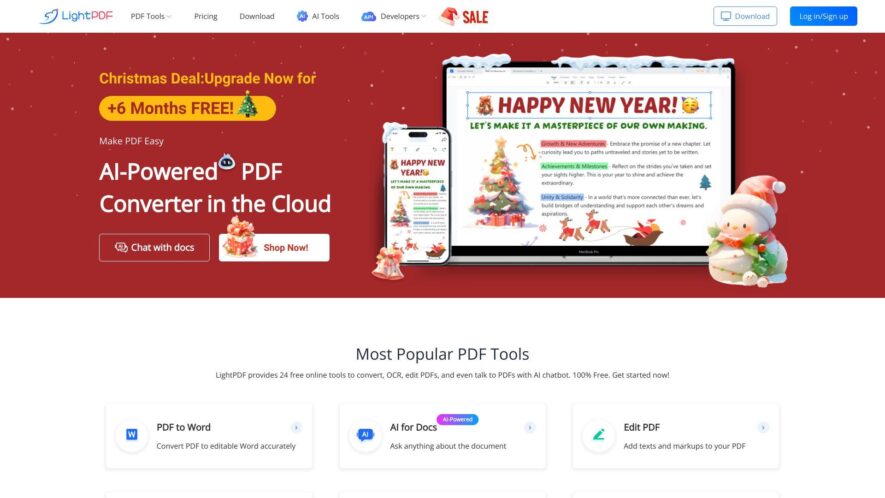
LightPDF is an all-in-one online PDF solution that offers a range of tools to edit, convert, and manage PDF files. With a user-friendly interface, users can easily convert PDF to Word, Excel, PowerPoint, and more, as well as merge, split, compress, and unlock PDF files. Additionally,...
LightPDF is an all-in-one online PDF solution that offers a range of tools to edit, convert, and manage PDF files. With a user-friendly interface, users can easily convert PDF to Word, Excel, PowerPoint, and more, as well as merge, split, compress, and unlock PDF files. Additionally, it provides OCR technology to recognize and extract text from scanned documents. The platform is cloud-based, secure, and accessible from anywhere, making it an ideal solution for individuals and businesses to manage their PDF needs.
Convert PDF to Word, Excel, PPT, and other formats with high accuracy.
Edit PDF text, images, and layouts with a intuitive interface.
Merge multiple PDF files into a single PDF document.
Split a large PDF file into multiple smaller PDF files.
Compress PDF files to reduce their size and improve sharing.
Add passwords and permissions to protect sensitive PDF content.
Remove watermarks, backgrounds, and headers from PDF files.
OCR scanned PDFs to extract editable text from images.
You Got Questions,We Got Answers
What is LightPDF?
A free online PDF editor that allows users to edit, convert, and sign PDF files without installing any software or registration. With a user-friendly interface, it's easy to use and accessible from anywhere.
Is LightPDF safe?
Yes, LightPDF is completely safe to use, as it doesn't require any personal information or installation of software, and all uploaded files are automatically deleted after 24 hours.
Can I edit PDFs offline?
No, LightPDF is an online PDF editor, which means you need an internet connection to access and use its features, but it's accessible from anywhere and on any device.
How do I convert PDFs?
Simply upload your PDF file to LightPDF, select the output format, and click "Convert" to download the converted file in what formats can I convert? You can convert PDF files to various formats, including DOCX, XLSX, PPTX, JPG, PNG, and more, with high-quality output and preserved formatting.
Is LightPDF free?
Yes, LightPDF offers a free version with most features available, but with some limitations, such as limited file size and conversion speed, and watermarks on output files.
Does LightPDF work on all operating systems and devices?
LightPDF is web-based and compatible with Windows, macOS, Linux, and mobile devices, requiring only an internet connection and browser access.
Use cases
Healthcare
Doctors can use LightPDF to convert medical records from PDF to editable Word documents, making it easier to update patient information and ensure compliance with HIPAA regulations
Finance
Financial analysts can convert complex financial reports from PDF to Excel, allowing for easier data analysis and visualization to inform investment decisions
Retail
Online retailers can use LightPDF to convert product catalogs from PDF to editable formats, streamlining the process of updating product information and ensuring consistency across all sales channels
Manufacturing
Quality control teams can convert inspection reports from PDF to editable formats, enabling them to quickly identify and address defects, reducing production downtime and increasing overall efficiency
Marketing
Marketing teams can use LightPDF to convert customer surveys from PDF to editable formats, making it easier to analyze customer feedback and inform marketing strategies
Education
Teachers can use LightPDF to convert educational resources from PDF to editable formats, allowing them to customize lesson plans and tailor instruction to meet the diverse needs of their students
Traffic and Engagement
Feb 2026 - Apr 2026
World wide
Monthly visitors (April)
1.8m
Page/Visit
2.4
Visit Duration
1m 33s
Bounce Rate
0.5%
Pricing
Freemium
$13.99
LightPDF Embeds
Copied!
Let your community know you're live on Skillcurb! Just drop a badge on your site’s homepage with just a few clicks. Showcasing the badge helps increase your visibility and connects you with users actively exploring top AI tools.