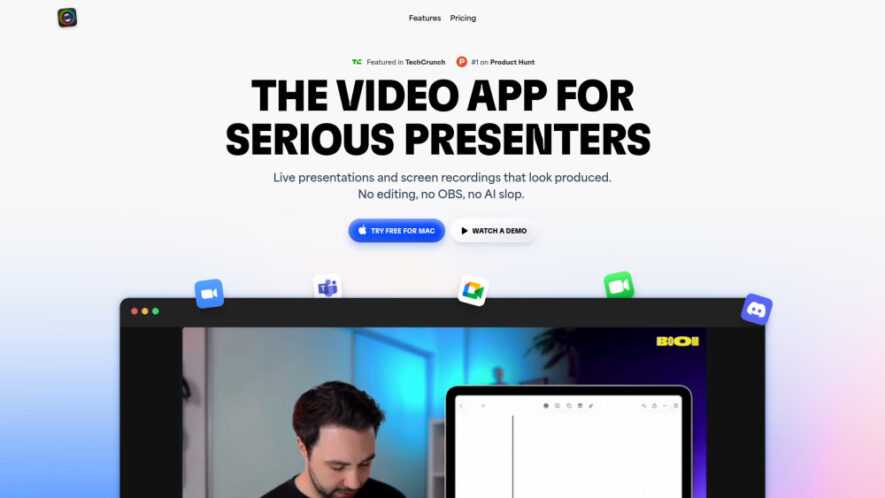
Boom for Mac is a powerful video presentation and screen recording platform designed for professionals who want to present and record seamlessly without editing. It enables users to create polished live presentations, record high-quality screen videos, and deliver engaging content in real time. With its intuitive...
Boom for Mac is a powerful video presentation and screen recording platform designed for professionals who want to present and record seamlessly without editing. It enables users to create polished live presentations, record high-quality screen videos, and deliver engaging content in real time. With its intuitive interface and built-in tools, Boom helps creators, educators, and professionals produce clean, professional-grade recordings effortlessly, saving time while maintaining excellent visual and audio quality.
Enables professional live presentations with smooth transitions and real-time control.
Records high-quality screen videos without requiring post-production editing steps.
Provides built-in tools for annotations, highlights, and on-screen explanations.
Supports seamless integration with Mac systems for optimized performance and stability.
Offers clean, distraction-free recording interface for professional-looking output.
Allows instant sharing of recorded presentations across platforms and teams.
Includes customizable layouts for different presentation and recording styles.
Ensures synchronized audio and video capture for clear communication quality.
You Got Questions,We Got Answers
1. How does Boom for Mac enable professional presentations without editing?
Boom allows users to present and record simultaneously, capturing polished output in real time. This eliminates the need for post-editing, making it ideal for professionals who want efficient and clean content creation.
2. What makes Boom for Mac suitable for screen recording on Mac devices?
The app is optimized specifically for Mac, ensuring smooth performance, high-quality recording, and seamless integration with macOS features, delivering a reliable recording experience.
3. Can users annotate or highlight content while presenting live on Boom?
Yes, Boom provides built-in annotation tools that allow users to highlight, draw, and emphasize key points during live presentations, improving audience engagement.
4. Is Boom for Mac suitable for creating educational content and tutorials?
Absolutely. Educators and creators can use Boom to produce tutorials, lectures, and demonstrations with clear visuals and professional-quality recordings.
5. Does Boom for Mac require advanced technical knowledge to operate effectively?
No, the platform is designed to be user-friendly. Its intuitive interface allows users to start presenting and recording quickly without requiring technical expertise.
6. How does Boom ensure high-quality audio and video during recordings?
Boom uses optimized recording technology to capture synchronized audio and video, ensuring clear sound and sharp visuals throughout the recording process.
7. Can recordings created in Boom be shared easily across platforms?
Yes, users can instantly share their recordings with teams or publish them on different platforms, making distribution simple and efficient.
8. Who benefits the most from using Boom for Mac presentations?
Professionals, educators, content creators, and trainers benefit most, as it helps them deliver high-quality presentations and recordings efficiently without extra editing work.
Use cases
1. Educators
Educators use Boom to create lectures and tutorials with clear visuals and professional recordings for students and online learning platforms.
2. Trainers
Trainers deliver engaging sessions by presenting and recording live demonstrations, making learning materials more interactive and effective.
3. ContentCreators
Content creators produce polished videos quickly, sharing tutorials, walkthroughs, and presentations without needing editing tools.
4. Marketers
Marketers create product demos and campaign presentations that are clean, professional, and ready for distribution instantly.
5. Developers
Developers record walkthroughs, bug explanations, and product demos to communicate ideas clearly with teams and users.
6. Businesses
Businesses use Boom for internal presentations, reports, and training materials, ensuring clear communication across teams.
7. Consultants
Consultants create client presentations and reports efficiently, delivering professional insights with minimal preparation time.
8. Students
Students use Boom to record presentations, assignments, and projects, presenting their work clearly and professionally.
Traffic and Engagement
N/A
World wide
Monthly visitors (January)
N/A
Page/Visit
N/A
Visit Duration
N/A
Bounce Rate
N/A
Pricing
Paid
$10
Boom for Mac: Present & Record Like a Pro Embeds
Copied!
Let your community know you're live on Skillcurb! Just drop a badge on your site’s homepage with just a few clicks. Showcasing the badge helps increase your visibility and connects you with users actively exploring top AI tools.