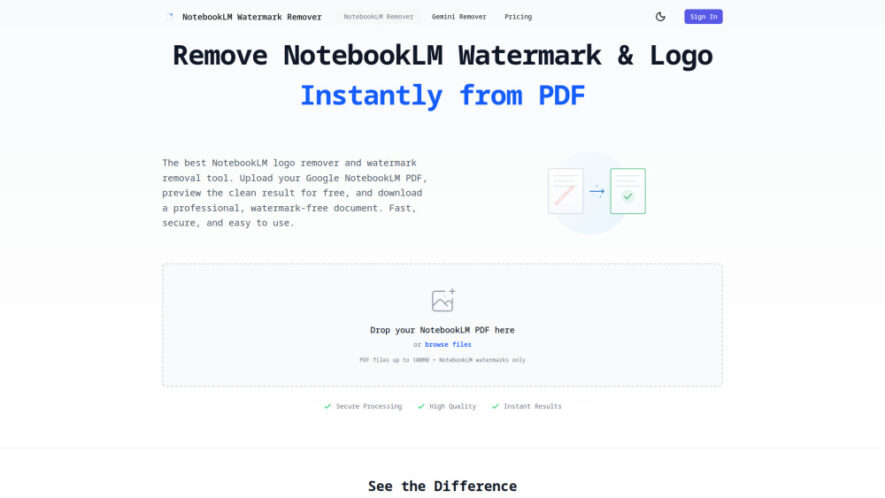
NotebookLM Watermark Remover is an AI-powered online solution that instantly removes NotebookLM PDF watermarks and logos without affecting document quality. Using advanced computer vision and inpainting technology, it preserves the original formatting, layout, and text while delivering clean, professional PDFs. The platform processes files securely with...
NotebookLM Watermark Remover is an AI-powered online solution that instantly removes NotebookLM PDF watermarks and logos without affecting document quality. Using advanced computer vision and inpainting technology, it preserves the original formatting, layout, and text while delivering clean, professional PDFs. The platform processes files securely with encryption, supports uploads up to 100MB, provides instant previews, and automatically deletes uploaded documents within 24 hours for maximum privacy.
AI accurately detects and removes NotebookLM watermarks without damaging document formatting.
Preserves original PDF text, fonts, images, layout, and overall document quality.
Instant side-by-side preview before downloading cleaned PDF documents with confidence.
Supports NotebookLM PDF uploads up to 100MB for convenient processing sessions.
Advanced computer vision ensures seamless watermark removal across every document page.
Secure encrypted file processing protects confidential documents throughout every upload session.
Automatically deletes uploaded files within twenty-four hours for enhanced user privacy.
Optimized exclusively for NotebookLM-generated PDFs, ensuring reliable and consistent removal performance.
You Got Questions,We Got Answers
1. How can I remove NotebookLM PDF watermarks?
Upload your NotebookLM PDF through the platform, wait for AI processing to complete, preview the cleaned version, and download the watermark-free document. The original formatting, layout, and text remain preserved throughout the entire process.
2. Does it support every NotebookLM PDF document?
The tool is specifically optimized for NotebookLM-generated PDFs and accurately detects their watermark placement. It delivers reliable removal results while maintaining document appearance, formatting, and readability across supported files.
3. What maximum PDF upload size is supported?
You can upload NotebookLM PDF files up to 100MB. This limit accommodates most reports, presentations, research documents, and educational materials while ensuring fast processing and efficient AI-powered watermark removal.
4. Is my uploaded PDF completely secure here?
Yes, uploaded files are encrypted during transfer and processing. Documents are automatically deleted within 24 hours, helping protect sensitive information and ensuring privacy throughout the watermark removal workflow.
5. Will original formatting remain unchanged after removal?
Yes, the AI preserves the original PDF layout, fonts, images, spacing, and text while removing NotebookLM watermarks. This ensures the finished document maintains a professional appearance without unwanted alterations.
6. Can I preview results before downloading files?
Yes, the platform provides an instant side-by-side preview, allowing you to compare the original and cleaned document before deciding to download the final watermark-free PDF version.
7. Is software installation required before using it?
No installation is required. Everything works directly in your web browser, allowing you to upload, preview, and download cleaned NotebookLM PDFs quickly from compatible desktop or mobile devices.
8. Who benefits most from this watermark remover?
Students, educators, researchers, business professionals, legal teams, and content creators can all use the tool to prepare clean, polished, and professional NotebookLM PDF documents for sharing or publication.
Use cases
Education
Students and educators create clean NotebookLM study guides, assignments, and classroom materials without distracting watermarks or branding elements.
Business
Professionals prepare polished reports, proposals, and presentations suitable for clients, partners, and executive meetings with clean document formatting.
Research
Researchers remove NotebookLM branding before distributing academic papers, reference materials, and collaborative documents to colleagues or institutions.
Publishing
Authors and editors prepare publication-ready manuscripts with professional presentation while maintaining the original PDF quality and formatting.
Legal
Legal teams produce clean documentation for internal reviews, compliance records, and official submissions requiring polished professional presentation.
Consulting
Consultants deliver client-ready reports with removed watermarks, improving document appearance while preserving original content and formatting integrity.
Training
Organizations distribute professional learning materials, employee guides, and instructional PDFs without unnecessary NotebookLM branding or watermarks.
Archiving
Individuals maintain organized digital archives containing clean NotebookLM PDFs for long-term storage, reference, and professional documentation purposes.
Pricing
Freemium
$9.99
NotebookLM Watermark Remover Embeds
Copied!
Let your community know you're live on Skillcurb! Just drop a badge on your site’s homepage with just a few clicks. Showcasing the badge helps increase your visibility and connects you with users actively exploring top AI tools.