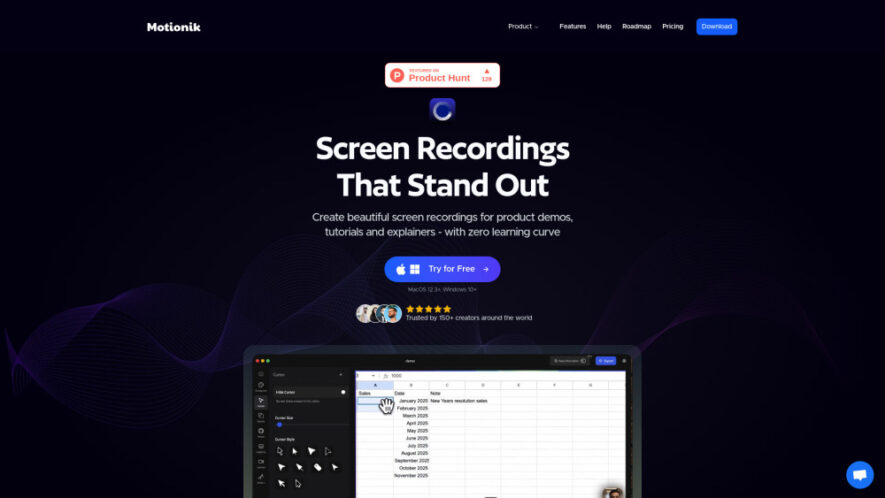
Motionik is a screen recording and video editing tool designed for creating polished product demos, tutorials, and explainer videos. It combines recording, smart auto zoom, cursor tracking, and editing in one streamlined workflow, helping users create professional-looking videos without switching between multiple applications. Motionik supports Windows...
Motionik is a screen recording and video editing tool designed for creating polished product demos, tutorials, and explainer videos. It combines recording, smart auto zoom, cursor tracking, and editing in one streamlined workflow, helping users create professional-looking videos without switching between multiple applications. Motionik supports Windows and macOS and includes webcam recording, audio, overlays, text, images, highlights, mobile recording, AI transcripts, and background-noise reduction.
Combines screen recording and video editing within one streamlined application.
Automatically zooms using intelligent cursor tracking for focused recordings.
Records full screens, windows, selected areas, webcams, and microphones.
Supports iPhone and iPad screen recording for mobile demonstrations.
Provides customizable backgrounds, shadows, rounded corners, and video appearance.
Adds overlays, text, images, highlights, masks, and audio tracks.
Offers cursor customization, click effects, trimming, and motion blur.
Uses AI for transcript generation and background-noise reduction during editing.
You Got Questions,We Got Answers
What is Motionik and how does it work?
Motionik is a screen recorder and built-in video editor designed for creating product demos, tutorials, and explainer videos. Users can record their screen, webcam, and microphone, then edit the footage with zoom effects, cursor customization, overlays, trimming, backgrounds, and other visual enhancements.
What operating systems does Motionik support?
Motionik supports both Windows and macOS. According to the provided information, the macOS version requires macOS 12.3 or newer, while the Windows version supports Windows 10 and later, allowing users across common desktop platforms to create and edit recordings.
Can Motionik automatically zoom into screen recordings?
Yes, Motionik includes automatic zoom with smart cursor tracking. The feature detects cursor movement and can automatically focus the recording on relevant areas, helping create naturally engaging demonstrations without requiring users to manually add every zoom effect during editing.
Can Motionik record webcams and microphones?
Yes, Motionik supports webcam and microphone recording alongside screen capture. Users can record their full display, a specific application window, or a selected screen area while incorporating camera footage and audio to create more complete tutorials, demonstrations, and presentations.
Does Motionik support recording iPhone and iPad screens?
Yes, Motionik includes mobile recording capabilities for iPhone and iPad screens. This makes the tool useful for demonstrating mobile applications, recording app walkthroughs, creating tutorials, and producing promotional content that requires direct mobile-device screen footage.
What editing tools are available inside Motionik?
Motionik provides tools for trimming videos, applying automatic or manual zoom, customizing cursors and click effects, adding motion blur, audio tracks, images, text, content masks, and highlights. Users can also customize backgrounds, shadows, rounded corners, and overall video appearance.
Does Motionik include artificial intelligence features?
Yes, Motionik includes AI-powered features for generating transcripts and reducing background noise. These capabilities can make recordings easier to understand and edit while improving audio quality and helping users create more accessible content from their screen recordings.
Can I move my Motionik license between devices?
The provided information indicates that license plans specify the number of personal devices supported, such as one or three devices. However, it does not explicitly confirm whether licenses can be transferred between devices, so users should check the current licensing terms.
Use cases
Demos
Create engaging product demonstrations that clearly showcase software features and workflows.
Tutorials
Produce informative step-by-step tutorials with focused screen recordings and helpful visual enhancements.
Create polished promotional videos showcasing products, services, features, and digital experiences.
Training
Record instructional materials for employees, customers, teams, and online learning programs.
Support
Create visual support guides demonstrating solutions to common software and technical problems.
Mobile
Record iPhone and iPad screens for mobile application demonstrations and tutorials.
Presentations
Build professional screen-based presentations using recordings, overlays, images, text, and highlights.
Traffic and Engagement
Jun 2026 - Aug 2026
World wide
Monthly visitors (August)
6.2k
Page/Visit
1.34
Visit Duration
6s
Bounce Rate
43.60%
Pricing
Freemium
$59.99
Motionik Embeds
Copied!
Let your community know you're live on Skillcurb! Just drop a badge on your site’s homepage with just a few clicks. Showcasing the badge helps increase your visibility and connects you with users actively exploring top AI tools.