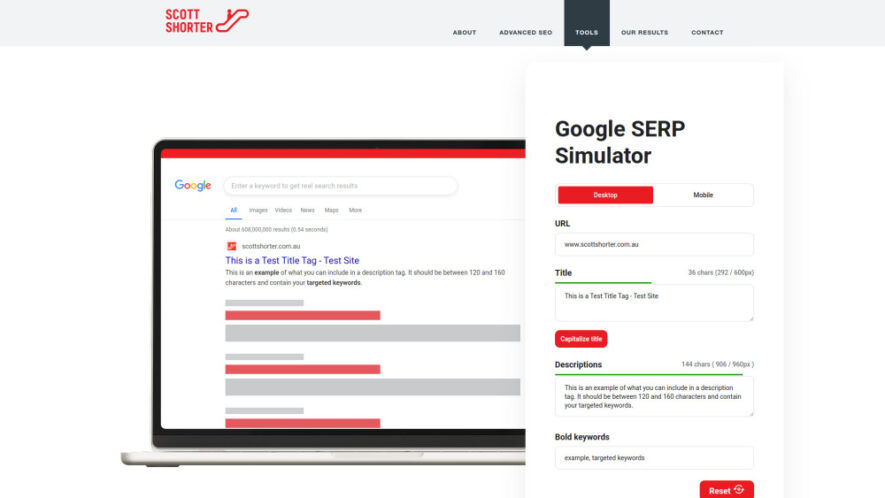
Google SERP Simulator is a useful SEO tool that previews how website meta titles and descriptions may appear in Google search results. It provides mobile and desktop views, favicon previews, and truncation warnings to help users optimize search snippets. By testing titles and descriptions before publishing,...
Google SERP Simulator is a useful SEO tool that previews how website meta titles and descriptions may appear in Google search results. It provides mobile and desktop views, favicon previews, and truncation warnings to help users optimize search snippets. By testing titles and descriptions before publishing, businesses can create clearer, more engaging SERP listings that communicate their value and encourage searchers to click.
Preview Google search snippets across both mobile and desktop layouts.
Simulate title tags and meta descriptions before publishing website pages.
Display favicon previews alongside simulated Google search result listings accurately.
Highlight potential truncation issues affecting titles and descriptions in search results.
Optimize descriptions to communicate unique selling points clearly and effectively.
Create engaging search titles while staying within recommended length limits.
Compare mobile and desktop SERP appearances for improved search presentation.
Improve snippet readability and appeal before publishing optimized website metadata.
You Got Questions,We Got Answers
What Is The Google SERP Simulator Used For?
The Google SERP Simulator helps users preview how website titles, descriptions, and favicons may appear in search results. It makes it easier to identify truncation issues and improve snippet presentation before publishing.
Can I Preview Search Results On Mobile And Desktop?
Yes, the simulator provides both mobile and desktop views. Users can compare how their search snippets appear across different device layouts and make adjustments to titles and descriptions accordingly.
Does The Tool Show Website Favicons In Search Results?
Yes, the Google SERP Simulator includes favicon previews alongside simulated search listings. This helps users evaluate how their website branding may appear visually within a Google-style search result.
Can It Detect Truncated Titles And Meta Descriptions?
Yes, the simulator provides warnings when titles or descriptions may be truncated. These warnings help users adjust their metadata so important information remains visible within search result previews.
How Can The Simulator Improve SEO Metadata?
The simulator helps users refine titles and descriptions before publishing. By previewing their appearance, users can create clearer, more engaging metadata that communicates value and potentially improves search result click appeal.
Why Should I Test Meta Titles Before Publishing Pages?
Testing titles helps identify length, readability, and presentation issues before pages go live. A simulator allows users to make adjustments early, helping ensure important messaging remains visible and engaging in search results.
Can Businesses Use This Tool To Improve Search Snippets?
Yes, businesses can use the simulator to refine search snippets for important website pages. It helps create readable titles and descriptions that highlight unique selling points and present information clearly.
Does The Simulator Guarantee Higher Google Rankings?
No, a SERP simulator cannot guarantee higher rankings. It helps optimize how search snippets may appear and communicate information, while rankings depend on many other SEO factors and Google's search algorithms.
Use cases
Preview
Preview how website pages may appear within Google search results before publishing.
Titles
Create engaging SEO titles while maintaining suitable lengths for search visibility.
Descriptions
Optimize meta descriptions to communicate benefits and encourage potential searchers to click.
Mobile
Check how search snippets appear across mobile Google search result layouts.
Desktop
Preview desktop SERP appearances and identify potential presentation or truncation issues.
Favicon
Verify how website favicons appear alongside simulated Google search listings.
SEO
Improve metadata presentation to support stronger search visibility and user engagement.
Testing
Test different titles and descriptions before implementing them across website pages.
Traffic and Engagement
Jun 2026 - Aug 2026
World wide
Monthly visitors (August)
3.3k
Page/Visit
1.33
Visit Duration
29s
Bounce Rate
37.75%
Pricing
Free
$0
Google SERP Simulator Embeds
Copied!
Let your community know you're live on Skillcurb! Just drop a badge on your site’s homepage with just a few clicks. Showcasing the badge helps increase your visibility and connects you with users actively exploring top AI tools.