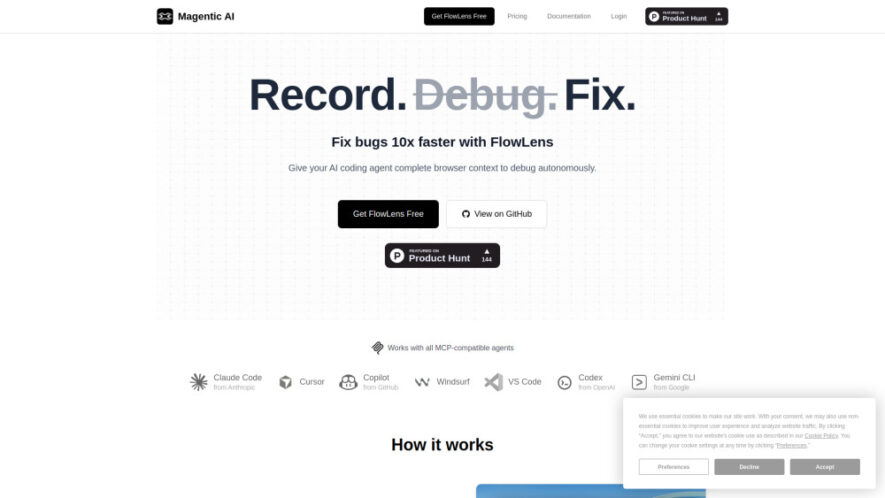
FlowLens is a Chrome extension and open-source MCP server that captures complete browser context during web application bugs. It records video, console logs, network requests, user actions, navigation, storage, and system information. Developers can instantly share this structured context with human teammates or compatible AI coding...
FlowLens is a Chrome extension and open-source MCP server that captures complete browser context during web application bugs. It records video, console logs, network requests, user actions, navigation, storage, and system information. Developers can instantly share this structured context with human teammates or compatible AI coding agents, enabling faster, more accurate debugging without repetitive copy-pasting or lengthy explanations. Privacy-focused features, local PII redaction, encryption, and local flows help protect sensitive information.
Captures video, logs, network requests, actions, storage, and system information automatically.
Provides AI-ready browser context through MCP-compatible coding agent integrations.
Records and shares complete bug reports with just one click.
Redacts personally identifiable information locally before sensitive data leaves browsers.
Optimizes captured debugging context for efficient AI agent token usage.
Supports Claude Code, Cursor, GitHub Copilot, Windsurf, and compatible agents.
Enables teams to organize, collaborate, and share flows through projects.
Continuously buffers browser activity for instant retroactive bug replay.
You Got Questions,We Got Answers
1. How does FlowLens improve web application debugging?
FlowLens automatically captures detailed browser context, including recordings, logs, network activity, and user actions. This gives developers and AI coding agents comprehensive information needed to understand, reproduce, and resolve web application bugs much faster.
2. Do I need additional software beyond Chrome extension?
The Chrome extension is sufficient for capturing and sharing bugs. However, users who want AI-powered debugging with compatible agents such as Claude Code or Cursor must additionally install and configure FlowLens's MCP server for structured debugging access.
3. How does FlowLens protect my sensitive debugging data?
FlowLens prioritizes privacy through local PII redaction, encryption, configurable capture filtering, and local flows. Sensitive information can remain stored entirely on your machine, helping developers debug applications without unnecessarily uploading private browser data.
4. Which AI coding agents can FlowLens support?
FlowLens supports MCP-compatible AI coding agents, including Claude Code, Cursor, GitHub Copilot, and Windsurf. Through MCP integration, these agents can access structured browser flow information, helping them analyze issues and provide more actionable debugging assistance.
5. Can teams collaborate using shared FlowLens bug reports?
Yes, teams can create projects, invite members, and share flows using links. Each shared flow provides comprehensive debugging context in one place, allowing developers, QA engineers, and other collaborators to understand issues without repeated explanations or manual data collection.
6. What are instant replay flows used for?
Instant replay flows continuously buffer recent browser activity, allowing users to save unexpected bugs retroactively. When an issue appears, users can capture the preceding activity without starting a recording beforehand, preserving valuable context that might otherwise disappear immediately.
7. What are local flows and who should use them?
Local flows remain stored exclusively on your machine and are never uploaded to the cloud. They are especially useful when debugging sensitive applications, handling private information, working offline, or maintaining stricter control over captured browser activity and debugging data.
8. What happens after reaching Free plan limits?
After reaching the Free plan's shareable flow limit, users can continue creating unlimited local flows. New shareable flows become available again the following month or after upgrading to Teams, while previously created shareable flows remain accessible.
Use cases
Debugging
Developers capture complete browser context and give AI agents everything needed to diagnose web application bugs faster.
Collaboration
Software teams share detailed flows containing recordings, logs, actions, and network information for efficient bug resolution.
AI coding agents analyze structured browser flows and independently investigate issues using comprehensive debugging context.
Replay
Developers retroactively capture unexpected bugs using continuously buffered browser activity without starting recordings beforehand.
Development
Engineering teams reduce debugging time by replacing lengthy explanations and manual evidence collection with automated contextual reports.
Privacy
Teams handling sensitive applications use local flows and privacy controls to keep debugging information securely on their machines.
Integration
Developers connect FlowLens with MCP-compatible coding agents to provide structured browser context for AI-assisted debugging workflows.
Traffic and Engagement
Jun 2026 - Aug 2026
World wide
Monthly visitors (August)
1.3k
Page/Visit
1.32
Visit Duration
1m 5s
Bounce Rate
43.09%
Pricing
Freemium
$11
FlowLens Embeds
Copied!
Let your community know you're live on Skillcurb! Just drop a badge on your site’s homepage with just a few clicks. Showcasing the badge helps increase your visibility and connects you with users actively exploring top AI tools.