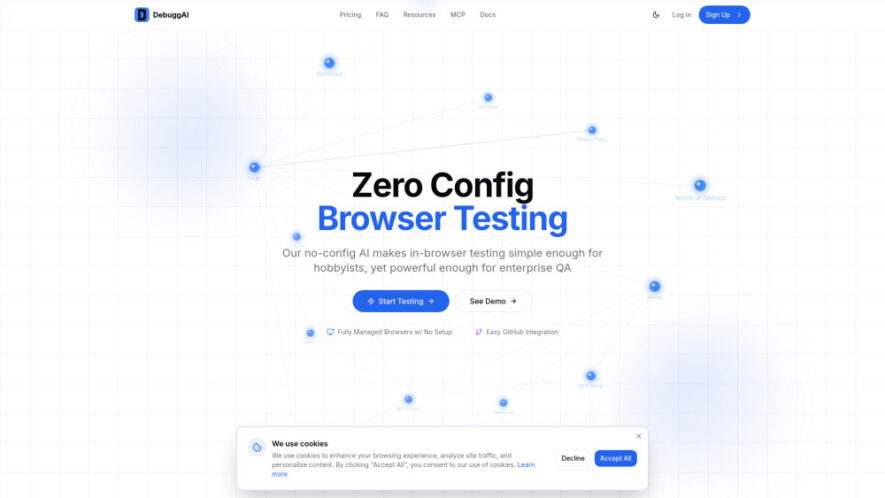
DebuggAI automates end-to-end browser testing for every GitHub pull request, helping developers catch regressions before merging code. It requires no configuration and handles repository cloning, application builds, secure tunneling, browser management, and AI-driven testing automatically. Test results, recordings, durations, and actionable insights appear directly within GitHub...
DebuggAI automates end-to-end browser testing for every GitHub pull request, helping developers catch regressions before merging code. It requires no configuration and handles repository cloning, application builds, secure tunneling, browser management, and AI-driven testing automatically. Test results, recordings, durations, and actionable insights appear directly within GitHub comments. By understanding applications through AI-powered knowledge graphs and user flows, DebuggAI delivers relevant tests with minimal setup.
Automatically run AI-powered browser tests whenever GitHub pull requests change.
Perform end-to-end testing using AI agents inside real browsers.
Integrate GitHub repositories quickly through a simple one-click connection.
Run comprehensive testing without requiring configuration or infrastructure setup.
Understand applications using AI-powered knowledge graphs and user flows.
Post test results, recordings, durations, and insights directly inside GitHub.
Secure applications through encrypted tunnels during automated browser testing sessions.
Fully manage repository cloning, builds, browsers, and testing infrastructure automatically.
You Got Questions,We Got Answers
What types of browser tests does DebuggAI perform?
DebuggAI performs automated end-to-end browser tests using AI agents and real browsers. It evaluates application behavior across important user flows, helping identify regressions and functionality problems before pull requests are merged.
How quickly can developers set up DebuggAI?
DebuggAI offers a setup process that takes approximately two minutes and requires no configuration. Developers simply connect their GitHub repository, after which testing can automatically begin whenever pull requests are updated.
Where are DebuggAI test results displayed after testing?
DebuggAI posts test results directly as comments on GitHub pull requests. Developers can review statuses, test durations, recordings, and actionable insights without leaving their normal GitHub development workflow.
Does DebuggAI require infrastructure setup from developers?
No, DebuggAI manages the testing infrastructure automatically. It handles repository cloning, dependency installation, application builds, secure tunneling, browser orchestration, and remote testing without requiring developers to configure infrastructure.
How does DebuggAI understand applications before testing?
DebuggAI uses AI to explore applications and create a knowledge graph covering pages, interactions, and user flows. This understanding helps its agents select relevant tests and evaluate application behavior effectively.
Can DebuggAI automatically test every pull request?
Yes, DebuggAI actively monitors connected GitHub repositories and automatically runs browser tests when new pull requests or commits appear. This provides continuous validation throughout the development and review process.
What benefits does DebuggAI provide development teams?
DebuggAI helps teams catch regressions earlier, reduce manual testing, accelerate pull request reviews, and improve confidence in application functionality. Automated testing also provides consistent validation before code reaches production.
Is DebuggAI suitable for enterprise quality assurance teams?
Yes, DebuggAI is designed to support both individual developers and enterprise QA workflows. Its managed infrastructure, AI-powered testing, secure tunnels, and automated browser orchestration help teams scale testing efficiently.
Use cases
Regression
Detect regressions across critical authentication, forms, checkout, and other user flows before deployment.
Pull Requests
Validate code changes automatically, helping development teams identify functional problems before merging pull requests.
E2E Testing
Automate end-to-end browser testing across commits to maintain consistent application quality continuously.
QA Automation
Reduce repetitive manual testing while accelerating quality assurance and development review cycles.
Code Quality
Verify applications function correctly after changes, giving developers greater confidence before releases.
PR Reviews
Provide actionable browser test results directly within GitHub, simplifying and strengthening pull request reviews.
User Flows
Analyze application pages and interactions to test important customer journeys automatically and consistently.
Enterprise QA
Scale automated browser testing with managed infrastructure, secure access, and AI-powered application understanding.
Traffic and Engagement
Jun 2026 - Aug 2026
World wide
Monthly visitors (August)
0.9k
Page/Visit
1.18
Visit Duration
0s
Bounce Rate
34.44%
Pricing
Freemium
$20
Debugg AI Embeds
Copied!
Let your community know you're live on Skillcurb! Just drop a badge on your site’s homepage with just a few clicks. Showcasing the badge helps increase your visibility and connects you with users actively exploring top AI tools.