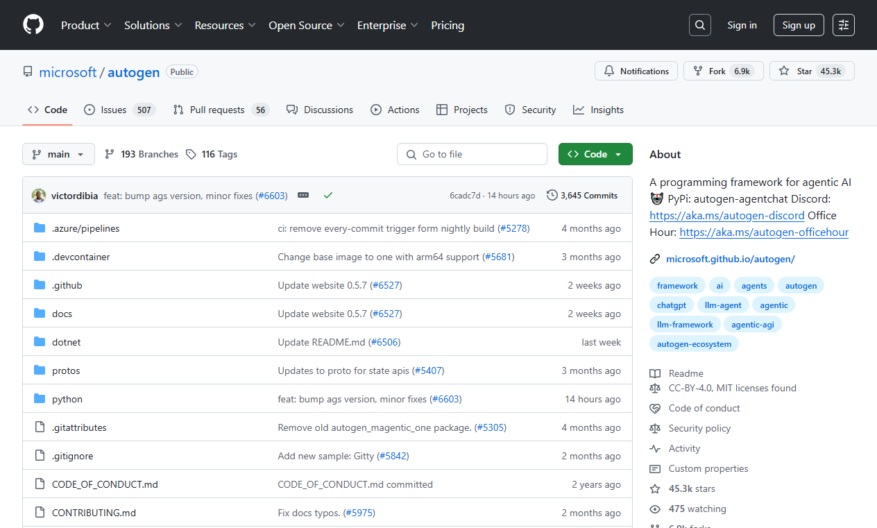
AutoGen supports the development of conversable agents that integrate LLMs, tools, and human feedback. It is compatible with autonomous and human-in-the-loop workflows and uses an event-driven architecture with asynchronous messaging. The system is scalable and can be distributed across machines and organizations. It offers a low-code...
AutoGen supports the development of conversable agents that integrate LLMs, tools, and human feedback. It is compatible with autonomous and human-in-the-loop workflows and uses an event-driven architecture with asynchronous messaging. The system is scalable and can be distributed across machines and organizations. It offers a low-code interface for rapid prototyping and deployment, customizable agents with tool registries and memory services, and includes built-in observability and debugging tools. AutoGen supports Python and .NET with multi-language interoperability.
Automatically generates boilerplate code for various programming languages.
Provides a wide range of customizable templates for different use cases.
Supports multiple output formats, including JSON, YAML, and XML.
Offers a flexible and extensible architecture for plugin development.
Allows users to define custom templates and plugins using TypeScript.
Includes a command-line interface for easy integration with development workflows.
Provides detailed documentation and guides for getting started and advanced usage.
Enables seamless integration with existing development tools and pipelines.
You Got Questions,We Got Answers
What is AutoGen?
AutoGen is a code generator that uses templates to generate code based on a model, allowing for rapid development and increased productivity.
What is the purpose of AutoGen?
The purpose of AutoGen is to simplify the development process by automating the generation of repetitive code, reducing errors, and increasing code quality.
How does AutoGen work?
AutoGen works by taking a model as input, applying templates to generate code, and then outputting the generated code that can be used in various applications.
What kind of code can AutoGen generate?
AutoGen can generate a wide range of code, including data models, business logic, and UI components, in various programming languages such as C#, Java, and TypeScript.
Can I customize AutoGen templates?
Yes, AutoGen templates can be customized to fit specific needs, enabling developers to tailor the generated code to their project requirements.
Is AutoGen only for Microsoft projects?
No, AutoGen is not limited to Microsoft projects, it can be used with any project that requires code generation, regardless of the company or technology stack.
How do I get started with AutoGen?
To get started with AutoGen, developers can clone the AutoGen repository, explore the documentation, and start generating code using the provided templates and examples.
What is the future of AutoGen?
The future of AutoGen looks promising, with ongoing development and maintenance by Microsoft, ensuring that AutoGen continues to evolve and improve, meeting the changing needs of developers and the industry.
Use cases
Healthcare
Automating the generation of patient reports and medical charts from electronic health records, reducing the administrative burden on healthcare providers and improving the accuracy of patient data
Finance
Generating automated financial reports and statements, such as balance sheets and income statements, to improve transparency and compliance with regulatory requirements
Retail
Creating personalized product recommendations and offers for customers based on their purchase history and preferences, increasing sales and customer satisfaction
Manufacturing
Automating the generation of assembly instructions and quality control checks for manufactured products, reducing production time and improving product reliability
Marketing
Generating targeted and personalized marketing campaigns based on customer data and behavior, increasing conversion rates and customer engagement
Education
Automating the generation of personalized learning plans and educational content for students, improving learning outcomes and teacher productivity
Traffic and Engagement
Feb 2026 - Apr 2026
World wide
Monthly visitors (April)
492.1m
Page/Visit
6.2
Visit Duration
6m 33s
Bounce Rate
0.4%
Pricing
Free
$0
AutoGen Embeds
Copied!
Let your community know you're live on Skillcurb! Just drop a badge on your site’s homepage with just a few clicks. Showcasing the badge helps increase your visibility and connects you with users actively exploring top AI tools.