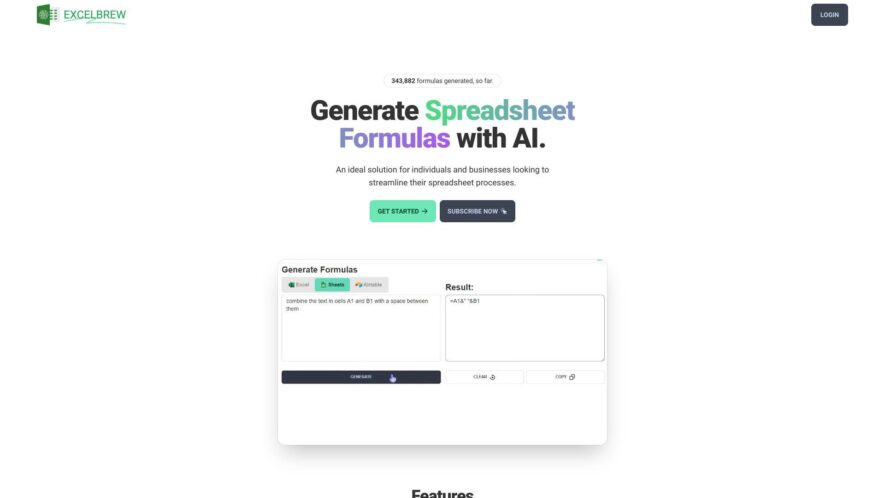
GPTExcel is an AI-powered spreadsheet assistant designed to streamline tasks in Excel, Google Sheets, and Airtable. It generates complex formulas, SQL queries, and automation scripts (VBA, Apps Script), helping users manage and analyze data more efficiently. Key features include formula explanation, image-to-table conversion, automated chart generation,...
GPTExcel is an AI-powered spreadsheet assistant designed to streamline tasks in Excel, Google Sheets, and Airtable. It generates complex formulas, SQL queries, and automation scripts (VBA, Apps Script), helping users manage and analyze data more efficiently. Key features include formula explanation, image-to-table conversion, automated chart generation, and data analysis with actionable insights. It supports over 50 languages and offers a free plan with limited daily requests and a Pro plan with increased usage and priority support.
AI-Powered Spreadsheet Automation: Generate complex formulas, create charts, and uncover deep insights for streamlined spreadsheets
Excel Formula Generator AI: Boost productivity with an AI assistant to generate and understand formulas in spreadsheets
Script Generator AI: Streamline workflow by effortlessly generating VBA, Apps, and Airtable scripts for automation
SQL Query Generator AI: Simplify crafting, troubleshooting, and refining intricate SQL queries across various database systems
Regex Generator AI: Generate and understand regular expression patterns for effective data validation and filtering
Template Generator AI: Generate table templates for Excel and Google Sheets to streamline data organization
Chat with Excel Files: Interact directly with Excel files, ask questions, and get insights through a conversational interface
Image-to-Table Conversion: Upload an image containing a table, and GPTExcel will convert it into an editable Excel table.
You Got Questions,We Got Answers
What is GPTExcel?
GPTExcel is an AI-powered tool that integrates with Microsoft Excel to provide advanced data analysis, automate repetitive tasks, and enhance decision-making with smart insights and predictions.
Who can benefit from using GPTExcel?
GPTExcel is designed for businesses, analysts, data scientists, and anyone who works with Excel and wants to leverage AI to improve data processing and decision-making efficiency.
How does GPTExcel work with Microsoft Excel?
GPTExcel integrates seamlessly into Excel, using AI to process and analyze data, generate reports, and automate tasks through natural language commands.
Can GPTExcel analyze large datasets?
GPTExcel is optimized to handle large datasets, offering advanced AI features that can process and analyze complex data faster than traditional Excel functionalities.
Is GPTExcel easy to use for non-technical users?
GPTExcel is designed to be user-friendly, with an intuitive interface and natural language processing that allows non-technical users to interact with Excel more efficiently.
Does GPTExcel support custom functions?
GPTExcel allows users to create and integrate custom AI-powered functions, making it versatile for various business and data analysis needs.
Is GPTExcel compatible with all versions of Microsoft Excel?
GPTExcel is compatible with the latest versions of Microsoft Excel, including Office 365 and Excel 2021, ensuring broad accessibility for users.
Does GPTExcel offer a trial or free version?
GPTExcel offers a free trial for users to explore its features before committing to a premium subscription for full access to all advanced functionalities.
Use cases
Healthcare
Healthcare administrators could use GPTExcel.uk to analyze patient feedback surveys for recurring themes, extract key information from medical transcriptions, or even generate initial drafts of reports based on spreadsheet data
Finance
Financial analysts could leverage GPTExcel.uk to generate complex financial formulas based on natural language descriptions, analyze large datasets of financial news for sentiment, or extract key figures from financial statements within Excel
Retail
Retail managers could utilize GPTExcel.uk to analyze sales data for trends, generate product descriptions based on features listed in a spreadsheet, or even create basic marketing copy for promotions
Manufacturing
Manufacturing planners could use GPTExcel.uk to generate production schedules based on demand forecasts in a spreadsheet, analyze quality control data for patterns, or extract key information from equipment maintenance logs
Marketing
Marketing professionals could employ GPTExcel.uk to analyze customer reviews for sentiment, generate social media posts based on product information in a spreadsheet, or even assist in drafting email marketing copy
Education
Educators could use GPTExcel.uk to help students analyze textual data in spreadsheets, generate summaries of research findings, or even assist in creating quizzes or learning materials based on spreadsheet content. Researchers could also use it to analyze survey data or extract information from textual datasets within Excel.
Traffic and Engagement
Feb 2026 - Apr 2026
World wide
Monthly visitors (April)
351.6k
Page/Visit
3
Visit Duration
1m 20s
Bounce Rate
0.4%
Pricing
Freemium
$6.99
GPT Excel Embeds
Copied!
Let your community know you're live on Skillcurb! Just drop a badge on your site’s homepage with just a few clicks. Showcasing the badge helps increase your visibility and connects you with users actively exploring top AI tools.