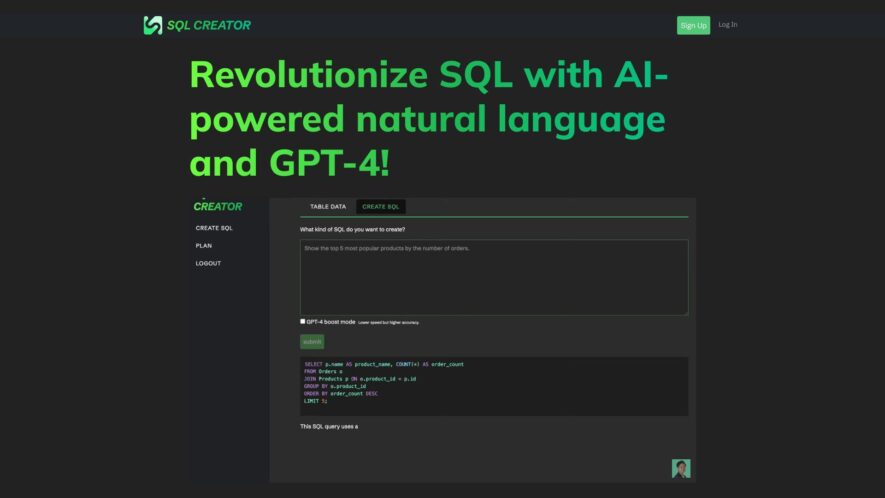
SQL Creator appears to be a tool designed to simplify SQL database management. It helps users generate SQL queries, even complex ones, and offers features for database design, optimization, and maintenance. It supports various database systems and aims to improve efficiency by automating tasks and providing...
SQL Creator appears to be a tool designed to simplify SQL database management. It helps users generate SQL queries, even complex ones, and offers features for database design, optimization, and maintenance. It supports various database systems and aims to improve efficiency by automating tasks and providing insights into database performance. Some versions also offer visual interfaces for easier database design and management.
Simplifies SQL query creation with an intuitive and user-friendly interface
Supports a wide variety of SQL databases, ensuring broad compatibility
Allows users to generate complex SQL queries without extensive SQL knowledge
Provides real-time syntax checking to help prevent errors in your SQL code
Offers customizable output formatting for improved readability and integration
Streamlines database interactions by automating the SQL query generation process.
You Got Questions,We Got Answers
What is SQL Creator?
SQL Creator is an AI-powered tool that helps users generate SQL queries from simple natural language inputs. It simplifies the process of creating and managing databases without needing deep SQL knowledge.
Who can use SQL Creator?
SQL Creator is designed for developers, data analysts, and business professionals who need to generate SQL queries quickly without writing complex code.
How does SQL Creator work?
SQL Creator uses natural language processing (NLP) and machine learning algorithms to translate user queries into SQL commands that can be executed on a database.
Can I integrate SQL Creator with my existing database?
SQL Creator can connect to various types of databases through API integration, allowing users to generate and run queries directly within their existing database environments.
Does SQL Creator support advanced SQL queries?
SQL Creator supports complex queries, including JOINs, subqueries, and aggregations, allowing users to generate even advanced SQL commands.
Is SQL Creator suitable for beginners?
SQL Creator is perfect for beginners as it simplifies SQL generation, but also provides enough flexibility for experienced users to create sophisticated queries.
Can I export the generated SQL queries?
SQL Creator allows users to export generated SQL queries in various formats such as .sql, .txt, or even directly into your database platform.
Is SQL Creator free to use?
SQL Creator offers both free and premium plans, with the premium plans unlocking additional features like advanced query customization and support for larger databases.
Use cases
Healthcare
Healthcare administrators or analysts who need to query patient databases for reports or analysis but lack deep SQL skills could use SQL Creator to easily retrieve specific data based on various criteria, such as patient demographics, treatment codes, or appointment dates.
Finance
Financial analysts or managers who need to extract data from financial databases for reporting, such as transaction records, account balances, or investment performance, could use SQL Creator to build the necessary queries without writing complex SQL code.
Retail
Retail managers or analysts who need to query sales databases to understand product performance, customer behavior, or inventory levels could use SQL Creator to generate the SQL queries required for these insights.
Manufacturing
Manufacturing planners or analysts who need to extract data from production databases, such as order details, material usage, or machine performance, could use SQL Creator to easily obtain the necessary information for planning and optimization.
Marketing
Marketing analysts who need to query customer databases to segment audiences, analyze campaign performance, or understand customer behavior could use SQL Creator to build the SQL queries required for their analysis.
Education
Educational administrators or researchers who need to query student information systems for reports on enrollment, grades, or demographics could use SQL Creator to generate the necessary SQL queries without in-depth SQL knowledge.
Traffic and Engagement
N/A
World wide
Monthly visitors (January)
N/A
Page/Visit
N/A
Visit Duration
N/A
Bounce Rate
N/A
Pricing
Free
$0
SQL CREATOR Embeds
Copied!
Let your community know you're live on Skillcurb! Just drop a badge on your site’s homepage with just a few clicks. Showcasing the badge helps increase your visibility and connects you with users actively exploring top AI tools.