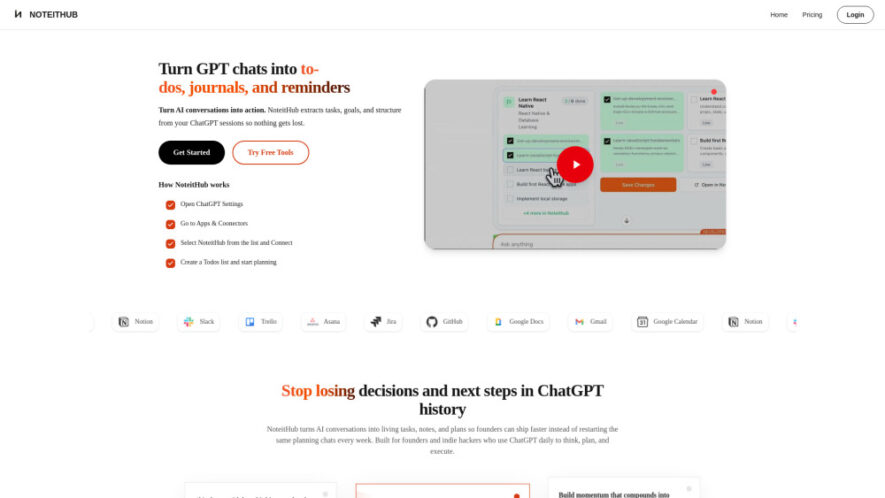
NoteitHub is a productivity tool that transforms ChatGPT conversations into structured, actionable outputs like to-do lists, journals, reminders, and organized notes. By integrating directly with ChatGPT, it automatically captures key insights, extracts tasks, and maintains context across discussions. Designed for professionals, students, and creators, it helps...
NoteitHub is a productivity tool that transforms ChatGPT conversations into structured, actionable outputs like to-do lists, journals, reminders, and organized notes. By integrating directly with ChatGPT, it automatically captures key insights, extracts tasks, and maintains context across discussions. Designed for professionals, students, and creators, it helps prevent information loss, improves organization, and enables users to move seamlessly from ideas to execution while tracking progress over time.
Automatically converts ChatGPT conversations into structured to-do lists and actionable tasks.
Generates organized notes and journals from fragmented chat discussions seamlessly.
Extracts key goals, decisions, and insights from conversations intelligently.
Maintains context across multiple chats for continuous workflow and idea tracking.
Searchable journal system enabling quick retrieval of past discussions and insights.
Real-time updates keeping tasks and notes aligned with ongoing conversations.
Easy integration within ChatGPT through apps and connectors settings interface.
Helps users transition from planning to execution with clear structured outputs.
You Got Questions,We Got Answers
How does NoteitHub convert ChatGPT conversations into organized outputs automatically?
NoteitHub analyzes your conversations, identifying tasks, key points, and decisions. It then structures them into to-do lists, notes, and reminders, ensuring your ideas are organized and easy to act upon.
Do I need to manually save chats for NoteitHub to work?
No, once connected, NoteitHub automatically captures and processes relevant conversations. This reduces manual effort and ensures important information is not lost in chat history.
Can I track progress on tasks generated from conversations over time?
Yes, NoteitHub allows you to manage and update tasks, helping you track progress across different conversations and maintain a clear workflow from planning to execution.
Is NoteitHub suitable for teams or only individual users currently?
While primarily designed for individual productivity, it can also support collaborative workflows by organizing shared ideas and tasks, depending on how users manage their processes.
How do I integrate NoteitHub with ChatGPT easily and quickly?
You can connect it through ChatGPT Settings under Apps & Connectors. Once enabled, it integrates seamlessly and starts organizing your conversations automatically.
What types of users benefit most from using NoteitHub daily?
Founders, students, developers, and marketers benefit the most. Anyone managing ideas, tasks, or projects through ChatGPT can use it to stay organized and productive.
Can I search and revisit past notes and extracted insights anytime?
Yes, the platform includes a searchable system, allowing you to quickly find past notes, decisions, and tasks without scrolling through entire chat histories.
Does NoteitHub help improve productivity and reduce information overload effectively?
Yes, by structuring conversations into actionable outputs, it reduces clutter and helps users focus on execution, improving efficiency and overall productivity.
Use cases
Startup
Organize ideas, tasks, and strategies from brainstorming sessions, helping founders quickly move from concept development to execution efficiently.
Education
Convert study discussions into structured notes and revision lists, improving learning organization and retention for students.
Development
Track coding tasks, bugs, and feature ideas from chats, ensuring better workflow management and project progress.
Marketing
Turn campaign ideas into actionable plans and task lists, helping teams execute strategies more effectively and consistently.
Writing
Organize story ideas, outlines, and drafts into structured notes, improving creative workflow and productivity.
Freelance
Manage client requirements and project tasks efficiently, ensuring clear communication and timely delivery of work.
Productivity
Maintain daily to-do lists and reminders generated from conversations, helping users stay organized and focused.
Research
Capture insights, summaries, and key findings from discussions, enabling better analysis and knowledge management over time.
Pricing
Free
NoteitHub Embeds
Copied!
Let your community know you're live on Skillcurb! Just drop a badge on your site’s homepage with just a few clicks. Showcasing the badge helps increase your visibility and connects you with users actively exploring top AI tools.