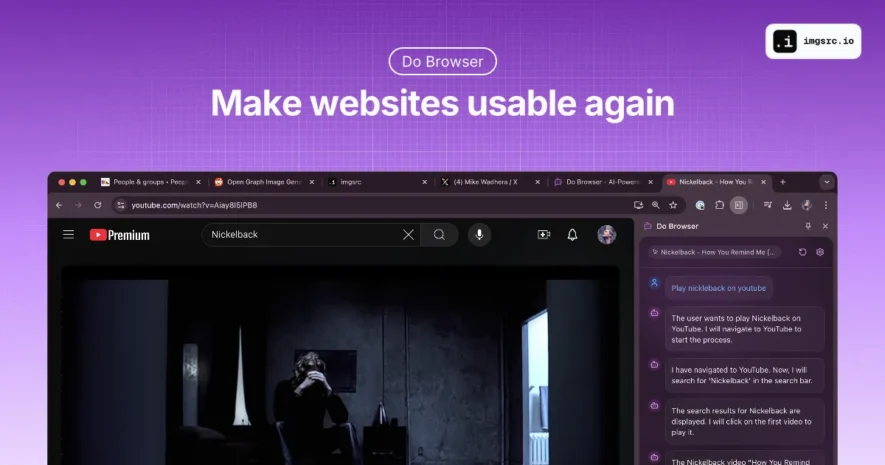
Do Browser is an intelligent AI-powered Chrome extension designed to transform web browsing by enabling users to execute complex tasks through natural language interactions. By understanding context and user intent, the extension acts as a proactive digital assistant within the browser environment. Accessible via text, voice,...
Do Browser is an intelligent AI-powered Chrome extension designed to transform web browsing by enabling users to execute complex tasks through natural language interactions. By understanding context and user intent, the extension acts as a proactive digital assistant within the browser environment. Accessible via text, voice, or shortcuts, it acts as a proactive assistant enhancing efficiency and simplifying web interactions.
Natural language processing interprets plain English commands accurately.
Multi-modal access via address bar, keyboard shortcut, or voice commands.
Customizable settings tailor the assistant to user workflows.
Supports shopping tasks including product search and price comparison.
Manages social media by drafting posts and handling communications.
Conducts deep browsing history analysis for research assistance.
Streamlines repetitive web tasks to boost productivity.
Generates content like images and infographics on demand.
You Got Questions,We Got Answers
How does Do Browser understand natural language commands?
Do Browser uses advanced NLP technology to interpret user instructions in plain English accurately.
What are the different ways to activate Do Browser?
You can activate it via the address bar, keyboard shortcut (Cmd/Ctrl + K), or voice commands.
Can I customize Do Browser to fit my workflow?
Yes, it offers configurable settings to adjust its behavior to your preferences.
Which tasks can Do Browser help with on social media?
It can draft posts, manage communications, and automate social media interactions.
Is Do Browser useful for research activities?
Absolutely, it analyzes browsing history and retrieves relevant information efficiently.
What content creation features does Do Browser offer?
It can generate images, infographics, and other supplementary content quickly.
How secure is signing into Do Browser?
The extension uses a simple and secure authentication process for user safety.
Is Do Browser compatible with all browsers?
It is designed exclusively for modern Chrome browsers only.
Use cases
E-commerce
Automates product searches, compares prices, and manages carts efficiently.
Social Media
Drafts content and manages social communications with ease.
Research
Analyzes browsing history and retrieves information quickly.
Productivity
Automates repetitive web tasks to improve workflow efficiency.
Content
Generates images and infographics to support content creation.
Traffic and Engagement
Apr 2026 - Jun 2026
World wide
Monthly visitors (June)
15.6k
Page/Visit
2.1
Visit Duration
43s
Bounce Rate
0.5%
Pricing
Freemium
$25
Do Browser Embeds
Copied!
Let your community know you're live on Skillcurb! Just drop a badge on your site’s homepage with just a few clicks. Showcasing the badge helps increase your visibility and connects you with users actively exploring top AI tools.