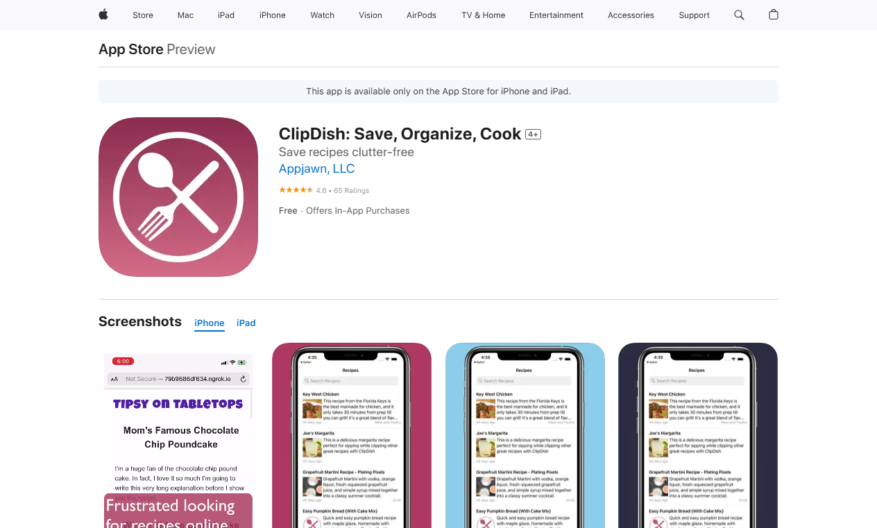
Introducing the ultimate tool designed to elevate your workflow and enhance productivity. This innovative solution offers a seamless experience, empowering users to accomplish tasks with efficiency and precision. With its user-friendly interface, even those new to technology can navigate effortlessly. The remarkable features include real-time collaboration...
Introducing the ultimate tool designed to elevate your workflow and enhance productivity. This innovative solution offers a seamless experience, empowering users to accomplish tasks with efficiency and precision. With its user-friendly interface, even those new to technology can navigate effortlessly. The remarkable features include real-time collaboration which fosters teamwork and communication, ensuring everyone is on the same page. Additionally, this tool provides comprehensive analytics that allow you to track your progress and make informed decisions. Experience the power of automation as it simplifies repetitive tasks, saving you valuable time. The robust security measures guarantee that your data remains protected and confidential. Whether you are a student, professional, or business owner, this tool is tailored to adapt to your unique needs. Embrace the future of productivity and transform how you work today. Do not miss out on the chance to maximize your potential and reach new heights of success.
Save any recipe from any website or app with a single click.
Organize recipes into personalized cookbooks and folders.
Tag and filter recipes by ingredient, course, or dietary restriction.
Convert between units of measurement with automatic conversions.
Scale recipes up or down for any number of servings.
Add notes and ratings to recipes for future reference.
Import recipes from popular cooking websites and blogs.
Access recipes offline for cooking on-the-go.
You Got Questions,We Got Answers
What is ClipDish and what does it do?
ClipDish is a recipe saving app that allows users to save and organize recipes from various sources, including websites, cookbooks, and food blogs, and access them offline, making it easy to cook and meal plan
How do I save a recipe on ClipDish?
To save a recipe, simply tap the "Clip" button on the app's browser, and ClipDish will automatically extract the recipe information, including ingredients, instructions, and images, and save it to your personal recipe book
Can I save recipes from any website?
Yes, ClipDish's browser allows you to save recipes from any website, including food blogs, cooking websites, and online cookbooks, as long as the website has a recipe format that can be extracted by the app
How do I organize my saved recipes?
ClipDish allows you to organize your saved recipes by categorizing them into folders, tagging them with keywords, and adding notes and ratings, making it easy to find and access your favorite recipes
Can I access my recipes offline?
Yes, ClipDish allows you to access your saved recipes offline, making it perfect for cooking in areas with poor internet connectivity, such as rural areas or while traveling
How do I import recipes from other apps?
ClipDish allows you to import recipes from other apps and services, including Paprika Recipe Manager, Yummly, and Plan to Eat, by exporting them as a CSV file and importing them into ClipDish
Use cases
Healthcare
Dietitians use ClipDish to save and organize healthy recipes for patients with specific dietary needs, creating personalized meal plans and tracking nutritional information to ensure optimal health outcomes
Finance
Financial advisors recommend ClipDish to clients seeking to reduce food expenses, allowing them to save and budget for meals, track grocery costs, and make data-driven decisions about their spending
Retail
Grocery stores partner with ClipDish to offer customers a seamless shopping experience, enabling them to save recipes, generate shopping lists, and purchase ingredients online or in-store, increasing customer loyalty and sales
Manufacturing
Food manufacturers use ClipDish to develop and test new recipes, streamlining product development, and gathering feedback from users to inform production and distribution decisions
Marketing
Social media influencers and bloggers utilize ClipDish to discover and save trending recipes, plan content, and engage with their audience, increasing brand awareness and driving website traffic
Education
Culinary students and instructors leverage ClipDish to access a vast recipe library, organize lesson plans, and track student progress, enhancing the learning experience and improving cooking skills
Traffic and Engagement
Mar 2026 - May 2026
World wide
Monthly visitors (May)
115.6m
Page/Visit
1.6
Visit Duration
50s
Bounce Rate
0.8%
Pricing
Free
$0
ClipDish Embeds
Copied!
Let your community know you're live on Skillcurb! Just drop a badge on your site’s homepage with just a few clicks. Showcasing the badge helps increase your visibility and connects you with users actively exploring top AI tools.