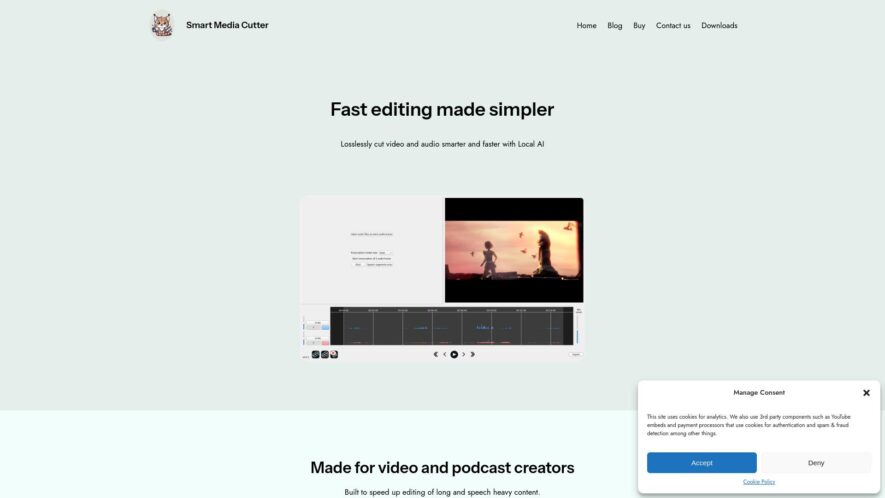
Smart Media Cutter is an innovative AI-powered tool tailored for video and podcast creators seeking a seamless editing experience. With its advanced features, users can efficiently cut video and audio files while maintaining original quality. The platform offers AI transcriptions that streamline the editing process, allowing...
Smart Media Cutter is an innovative AI-powered tool tailored for video and podcast creators seeking a seamless editing experience. With its advanced features, users can efficiently cut video and audio files while maintaining original quality. The platform offers AI transcriptions that streamline the editing process, allowing for quick removal of unwanted content. Additionally, Smart Media Cutter includes a powerful speech denoiser, ensuring clear audio even in complex scenarios. This tool is perfect for those handling long and speech-heavy content, providing a user-friendly interface for precise edits without the need for re-coding. Privacy is prioritized through local AI processing, enhancing user confidence. Whether you are a seasoned professional or a beginner, Smart Media Cutter elevates your editing workflow with its robust capabilities. Join the growing community on Discord or reach out for support to maximize your editing potential. Experience the future of media editing with Smart Media Cutter.
Cut and trim video files with precision using advanced timeline editing tools.
Split large video files into smaller segments for easier sharing and uploading.
Merge multiple video files into a single video file with customizable transition effects.
Add text, image, and shape overlays to videos with advanced formatting options.
Adjust video speed, brightness, and contrast for optimal playback quality.
Extract audio from video files and save as separate audio files.
Rotate, flip, and crop videos to adjust orientation and aspect ratio.
Add watermarks and logos to videos for branding and copyright protection.
You Got Questions,We Got Answers
What is Smart Media Cutter?
Smart Media Cutter is a powerful video editing tool that allows users to trim, split, and merge video files with ease, supporting a wide range of file formats, including MP4, AVI, and MOV
What file formats are supported?
Smart Media Cutter supports a wide range of file formats such as MP4, AVI, MOV, FLV, and more, making it a versatile video editing tool for various needs
Can I merge multiple files?
Yes, Smart Media Cutter allows users to merge multiple video files into a single file, making it easy to combine clips, add transitions, and create a single video
How do I split a video?
To split a video, simply select the video file, set the start and end" time, and click the "Split" button, and Smart Media Cutter will split the video into two separate files
Is Smart Media Cutter free to use?
Smart Media Cutter offers a free version with limited features, but users can upgrade to the premium version for advanced features, unlimited video editing, and priority customer support
What is the maximum file size?
The maximum file size supported by Smart Media Cutter is 1GB, but users can upgrade to the premium version for larger file size support and advanced features
Can I use it on Mac?
Yes, Smart Media Cutter is compatible with both Windows and Mac operating systems, making it a versatile video editing tool for various platforms
Is customer support available?
Yes, Smart Media Cutter offers 24/7 customer support via email, phone, and online chat, ensuring users get prompt assistance with any video editing or technical queries
Use cases
Healthcare
A medical research team uses Smart Media Cutter to extract and analyze specific scenes from medical procedure videos, improving training and reducing costs
Finance
A financial services company employs Smart Media Cutter to extract and edit customer testimonials, creating engaging marketing materials that drive sales and build brand loyalty
Manufacturing
A manufacturing company utilizes Smart Media Cutter to create instructional videos for its products, reducing assembly time and increasing customer satisfaction
Marketing
A digital marketing agency uses Smart Media Cutter to extract and edit social media clips, creating viral campaigns that increase brand awareness and drive engagement
Traffic and Engagement
Mar 2026 - May 2026
World wide
Monthly visitors (May)
74
Page/Visit
1.1
Visit Duration
N/A
Bounce Rate
0.5%
Pricing
Freemium
$39
Smart Media Cutter Embeds
Copied!
Let your community know you're live on Skillcurb! Just drop a badge on your site’s homepage with just a few clicks. Showcasing the badge helps increase your visibility and connects you with users actively exploring top AI tools.