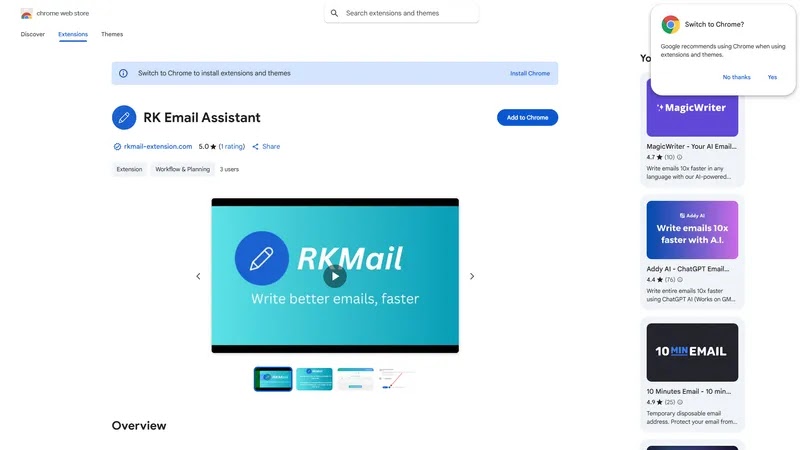
RK Email Assistant is a Chrome extension that helps manage emails by providing features such as email tracking, email scheduling, and email reminders. It also offers email templates, email analytics, and integration with popular CRM systems. The extension allows users to track when recipients open or...
RK Email Assistant is a Chrome extension that helps manage emails by providing features such as email tracking, email scheduling, and email reminders. It also offers email templates, email analytics, and integration with popular CRM systems. The extension allows users to track when recipients open or click on emails, schedule emails to be sent later, and set reminders for follow-up emails. Additionally, it provides insights into email performance and helps users optimize their email campaigns.
Automatically suggests relevant email templates based on email content.
Sends personalized email responses with just a few clicks.
Provides instant access to frequently used email responses and templates.
Enables users to create and manage custom email templates easily.
Offers a range of pre-built email templates for common scenarios.
Allows users to insert custom variables into email templates dynamically.
Supports integration with popular email clients and services seamlessly.
Tracks and analyzes email response rates and other key metrics effectively.
You Got Questions,We Got Answers
What is RK Email Assistant?
RK Email Assistant is a Chrome extension that helps you manage your email inbox more efficiently by providing features such as email tracking, email templates, and email analytics
How do I install RK Email Assistant?
To install RK Email Assistant, simply click the "Add to Chrome" button on the Chrome Web Store page, then confirm the installation by clicking "Add extension" in the pop-up window
What features does RK Email Assistant offer?
RK Email Assistant offers a range of features including email tracking, email templates, email analytics, and more, all designed to help you streamline your email workflow and increase productivity
Is RK Email Assistant free to use?
RK Email Assistant offers a free version with limited features, as well as a premium subscription that unlocks additional features and support, allowing you to choose the plan that best suits your needs
How does RK Email Assistant track emails?
RK Email Assistant uses a proprietary algorithm to track emails, providing real-time updates on whether your emails have been opened, clicked, or bounced, helping you stay on top of your email communications
Can I customize RK Email Assistant?
Yes, RK Email Assistant allows you to customize the extension to fit your specific needs, including setting up custom email templates, creating personalized email signatures, and more
Is RK Email Assistant compatible with Gmail?
Yes, RK Email Assistant is fully compatible with Gmail, and can be used seamlessly with your existing Gmail account, providing a range of features to enhance your email experience
How do I get support for RK Email Assistant?
If you have any questions or issues with RK Email Assistant, you can contact our dedicated support team through the Chrome Web Store page or our website, and we'll be happy to assist you
Use cases
Finance
Automate email responses to customer inquiries about account balances and transaction history, freeing up customer support agents to focus on complex issues
Healthcare
Streamline communication between healthcare providers and patients by auto-generating appointment reminders and medication instructions
Education
Use the email assistant to send personalized learning resources and assignment reminders to students, reducing teacher workload
RealEstate
Send automated email responses to property inquiries, providing potential buyers with property details and scheduling viewings
Travel
Auto-generate travel itineraries and flight updates, ensuring that customers receive timely and accurate information about their trips
Retail
Respond to customer inquiries about product availability and order status, improving customer satisfaction and reducing support tickets
Traffic and Engagement
Jun 2026 - Aug 2026
World wide
Monthly visitors (August)
205.8m
Page/Visit
2.8
Visit Duration
1m 57s
Bounce Rate
0.6%
Pricing
FREE
$0
RKMail – Chrome Extension Embeds
Copied!
Let your community know you're live on Skillcurb! Just drop a badge on your site’s homepage with just a few clicks. Showcasing the badge helps increase your visibility and connects you with users actively exploring top AI tools.